
The best STL splitters in 2026, compared
A 400 mm helmet does not care that your bed is 256 mm. This page compares five STL splitters on the jobs that actually matter: where you can cut, whether the parts go back together, and whether the file has to leave your device.
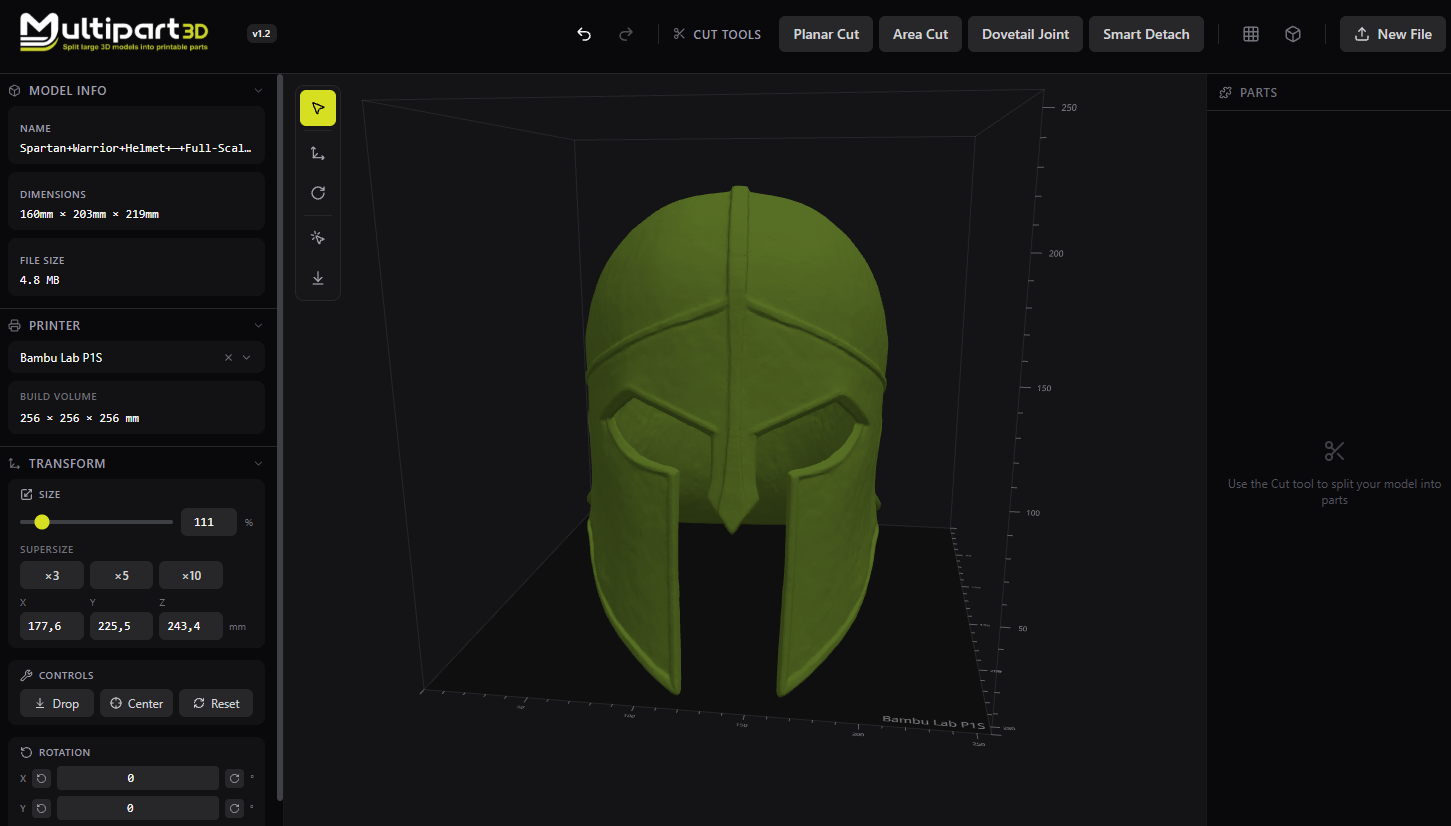
Published by Multipart3d.com. We built one of the tools in this chart. Scores are ours.
Most “split STL” tools do one of three jobs. They grid a model to a printer bed. They try to guess the parts of a character. Or they let you place a cut, preview the seam, and add joints so the print actually assembles. On 3 September 2026 we opened five of them: Multipart3d.com, 3dsplitter.com, Split3r, stl-splitter.com, and Meshy Auto Split.
Multipart3d.com is built for the jobs most people actually have: a Printables or MakerWorld STL file that is too tall, an arm that should print flat, a visor that needs magnets, a painted 3MF that should come apart by color, and a file you do not want sitting on somebody else’s server.
Where each tool fits
- Where Multipart3d.com excels. Interactive cuts, a connector library (including magnets and snap-fits), painted 3MF, no account, nothing uploaded.
- Auto-chop to a bed. stl-splitter.com when you want a grid and pegs with almost no thinking. Split3r if the mesh is huge and you will print it on several machines.
- Desktop / print farm. Split3r. Numbered parts, tenons, explode view, AutoShell, paid license.
- If the model was born in an AI tool. Meshy Auto Split, for untextured Meshy drafts. Wrong tool for a random MakerWorld STL.
- Skip all of this. If you only need a single flat plane in PrusaSlicer, do that in the slicer and save the extra app.
STL splitter comparison chart
Stars are graded. Checkmarks are binary. On a phone you get one card per tool. On a wider screen you get the full matrix. The Multipart3d.com column is highlighted because this is our page, not because every row is a win. Auto-split to build volume is an honest loss.
#1 Multipart3d.com
Interactive cuts and connectors
- Cutting options
- ★★★★★ 5 out of 5
- Connector / joinery quality
- ★★★★★ 5 out of 5
- Privacy
- ★★★★★ 5 out of 5
- Value
- ★★★★★ 5 out of 5
- No account required
- ✓
- No file upload / runs locally
- ✓
- Painted 3MF / color split
- ✓
- Auto-split to build volume
- ✗
- Connectors: magnets
- ✓
#2 3dsplitter.com
Free browser lab
- Cutting options
- ★★★☆☆ 3 out of 5
- Connector / joinery quality
- ★★★☆☆ 3 out of 5
- Privacy
- ★★★★☆ 4 out of 5
- Value
- ★★★★★ 5 out of 5
- No account required
- ✓
- No file upload / runs locally
- ~
- Painted 3MF / color split
- ~
- Auto-split to build volume
- ✓
- Connectors: magnets
- ✗
#3 Split3r
Desktop print farm
- Cutting options
- ★★★☆☆ 3 out of 5
- Connector / joinery quality
- ★★★★☆ 4 out of 5
- Privacy
- ★★★★☆ 4 out of 5
- Value
- ★★★☆☆ 3 out of 5
- No account required
- ✓
- No file upload / runs locally
- ✓
- Painted 3MF / color split
- ✓
- Auto-split to build volume
- ✓
- Connectors: magnets
- ✗
#4 stl-splitter.com
Auto bed chop
- Cutting options
- ★★☆☆☆ 2 out of 5
- Connector / joinery quality
- ★★★☆☆ 3 out of 5
- Privacy
- ★★★★★ 5 out of 5
- Value
- ★★★★★ 5 out of 5
- No account required
- ✓
- No file upload / runs locally
- ✓
- Painted 3MF / color split
- ✗
- Auto-split to build volume
- ✓
- Connectors: magnets
- ✗
#5 Meshy
AI generator with Auto Split
- Cutting options
- ★★★☆☆ 3 out of 5
- Connector / joinery quality
- ★★★☆☆ 3 out of 5
- Privacy
- ★☆☆☆☆ 1 out of 5
- Value
- ★★☆☆☆ 2 out of 5
- No account required
- ✗
- No file upload / runs locally
- ✗
- Painted 3MF / color split
- ~
- Auto-split to build volume
- ✓
- Connectors: magnets
- ✗
| Criteria | Multipart3d.com | 3dsplitter.com | Split3r | stl-splitter.com | Meshy |
|---|---|---|---|---|---|
| Cutting options | ★★★★★ 5 out of 5 | ★★★☆☆ 3 out of 5 | ★★★☆☆ 3 out of 5 | ★★☆☆☆ 2 out of 5 | ★★★☆☆ 3 out of 5 |
| Connector / joinery quality | ★★★★★ 5 out of 5 | ★★★☆☆ 3 out of 5 | ★★★★☆ 4 out of 5 | ★★★☆☆ 3 out of 5 | ★★★☆☆ 3 out of 5 |
| Precision / interactive control | ★★★★☆ 4 out of 5 | ★★★★☆ 4 out of 5 | ★★★★☆ 4 out of 5 | ★★★☆☆ 3 out of 5 | ★☆☆☆☆ 1 out of 5 |
| Ease of use | ★★★★★ 5 out of 5 | ★★★☆☆ 3 out of 5 | ★★☆☆☆ 2 out of 5 | ★★★★☆ 4 out of 5 | ★★★☆☆ 3 out of 5 |
| Privacy | ★★★★★ 5 out of 5 | ★★★★☆ 4 out of 5 | ★★★★☆ 4 out of 5 | ★★★★★ 5 out of 5 | ★☆☆☆☆ 1 out of 5 |
| 3MF / color workflow | ★★★★☆ 4 out of 5 | ★★★☆☆ 3 out of 5 | ★★★★☆ 4 out of 5 | ★★☆☆☆ 2 out of 5 | ★★☆☆☆ 2 out of 5 |
| Printer / build-volume awareness | ★★★★☆ 4 out of 5 | ★★★★☆ 4 out of 5 | ★★★★★ 5 out of 5 | ★★★★★ 5 out of 5 | ★★★☆☆ 3 out of 5 |
| Export quality | ★★★★☆ 4 out of 5 | ★★★★☆ 4 out of 5 | ★★★★★ 5 out of 5 | ★★★☆☆ 3 out of 5 | ★★★★☆ 4 out of 5 |
| Value | ★★★★★ 5 out of 5 | ★★★★★ 5 out of 5 | ★★★☆☆ 3 out of 5 | ★★★★★ 5 out of 5 | ★★☆☆☆ 2 out of 5 |
| Typical maker jobs | ★★★★★ 5 out of 5 | ★★★★☆ 4 out of 5 | ★★★★☆ 4 out of 5 | ★★★☆☆ 3 out of 5 | ★★☆☆☆ 2 out of 5 |
| No account required | ✓ | ✓ | ✓ | ✓ | ✗ |
| No file upload / runs locally | ✓ | ~ | ✓ | ✓ | ✗ |
| Free to use (core splitting) | ✓ | ✓ | ✗ | ✓ | ~ |
| Browser (no install) | ✓ | ✓ | ✗ | ✓ | ✓ |
| Desktop app | ✗ | ✗ | ✓ | ✗ | ✗ |
| STL import | ✓ | ✓ | ✓ | ✓ | ~ |
| 3MF import | ✓ | ✓ | ✓ | ✓ | ✗ |
| OBJ import | ✗ | ✓ | ✓ | ✗ | ~ |
| Painted 3MF / color split | ✓ | ~ | ✓ | ✗ | ~ |
| Planar cut | ✓ | ✓ | ✓ | ✓ | ✗ |
| Bounded / area / window cut | ✓ | ~ | ~ | ✗ | ✗ |
| Dovetail or interlocking seam | ✓ | ✓ | ✓ | ✗ | ✗ |
| Feature / semantic detach | ✓ | ✗ | ~ | ✗ | ✓ |
| Auto-split to build volume | ✗ | ✓ | ✓ | ✓ | ✓ |
| Manual multi-plane cuts | ✓ | ✓ | ✓ | ✓ | ✗ |
| Connectors: alignment pins / dowels | ✓ | ✓ | ✓ | ✓ | ✓ |
| Connectors: magnets | ✓ | ✗ | ✗ | ✗ | ✗ |
| Connectors: snap-fits | ✓ | ✗ | ✗ | ✗ | ✗ |
| Printer presets | ✓ | ✓ | ✓ | ✓ | ~ |
| Build-volume preview | ✓ | ✓ | ✓ | ✓ | ✓ |
| Mesh repair / make-solid | ✗ | ✗ | ✓ | ~ | ✓ |
| Hollowing / shell | ✗ | ✓ | ✓ | ✗ | ✗ |
| Commercial use allowed | ✓ | ~ | ✓ | ~ | ~ |
| Watermark-free export | ✓ | ✓ | ✓ | ✓ | ✓ |
| Mobile usable for precision cuts | ✗ | ✗ | ✗ | ✗ | ~ |
| Active development in 2026 | ✓ | ✓ | ✓ | ✓ | ✓ |
Footnotes. Meshy “STL import” is marked partial because the marketing page accepts STL/OBJ/GLB while the help center and 2026 tutorial still say Auto Split is for untextured Meshy 6/7 drafts, not an arbitrary upload. 3dsplitter.com “runs locally” is partial because the live app needs no login, but we did not packet-trace it. Split3r “no account” means no web signup; you still buy a license and activate online. Commercial use is explicit on Multipart3d.com. Meshy’s free plan is CC BY 4.0. The others do not spell it out on the homepage.
Who should use which
Cosplay helmet on a 256 mm bed
- Multipart3d.com
- Best
- 3dsplitter.com
- OK
- Split3r
- OK
- stl-splitter.com
- OK
- Meshy
- No
1:1 statue / print farm overnight
- Multipart3d.com
- OK
- 3dsplitter.com
- OK
- Split3r
- Best
- stl-splitter.com
- OK
- Meshy
- No
AI-generated figurine (Meshy draft)
- Multipart3d.com
- OK
- 3dsplitter.com
- OK
- Split3r
- OK
- stl-splitter.com
- OK
- Meshy
- Best
Painted multi-color armor 3MF
- Multipart3d.com
- Best
- 3dsplitter.com
- OK
- Split3r
- OK
- stl-splitter.com
- No
- Meshy
- No
Magnet-on visor or accessory
- Multipart3d.com
- Best
- 3dsplitter.com
- No
- Split3r
- No
- stl-splitter.com
- No
- Meshy
- No
Classroom / no-account constraint
- Multipart3d.com
- Best
- 3dsplitter.com
- OK
- Split3r
- No
- stl-splitter.com
- Best
- Meshy
- No
| Criteria | Multipart3d.com | 3dsplitter.com | Split3r | stl-splitter.com | Meshy |
|---|---|---|---|---|---|
| Cosplay helmet on a 256 mm bed | Best | OK | OK | OK | No |
| 1:1 statue / print farm overnight | OK | OK | Best | OK | No |
| AI-generated figurine (Meshy draft) | OK | OK | OK | OK | Best |
| Painted multi-color armor 3MF | Best | OK | OK | No | No |
| Magnet-on visor or accessory | Best | No | No | No | No |
| Classroom / no-account constraint | Best | OK | No | Best | No |
What an STL splitter is (and is not)
A splitter takes one mesh and returns several meshes. You still slice those parts in Bambu Studio, Orca, PrusaSlicer, or Cura. If a page promises G-code, it is a slicer wearing a splitter hat.
Slicer cut tools are real, and they are enough when you want one flat plane and a dab of glue. They fall over when you need a window cut that does not slice the whole body, interlocking teeth, a clicked feature that peels off, magnet pockets with a 0.2 mm clearance, or a painted 3MF that should become separate printable parts.
Meshmixer can still plane-cut. It is also a 2017 Autodesk leftover. CAD can do all of this if you already live there. Most people searching “split STL” have a download from MakerWorld and a 256 mm bed. They should not have to open Fusion to take an arm off a figurine.
Size is only one reason to cut. You also split to print an overhang as a flat part, to stand a face upright for cleaner layers, to print colors as separate meshes, to align layer lines with load, and to make a fragile antenna a reprint instead of a whole model. A tool that only grids to the bed treats all of those jobs as the same problem.
#1 Multipart3d.com
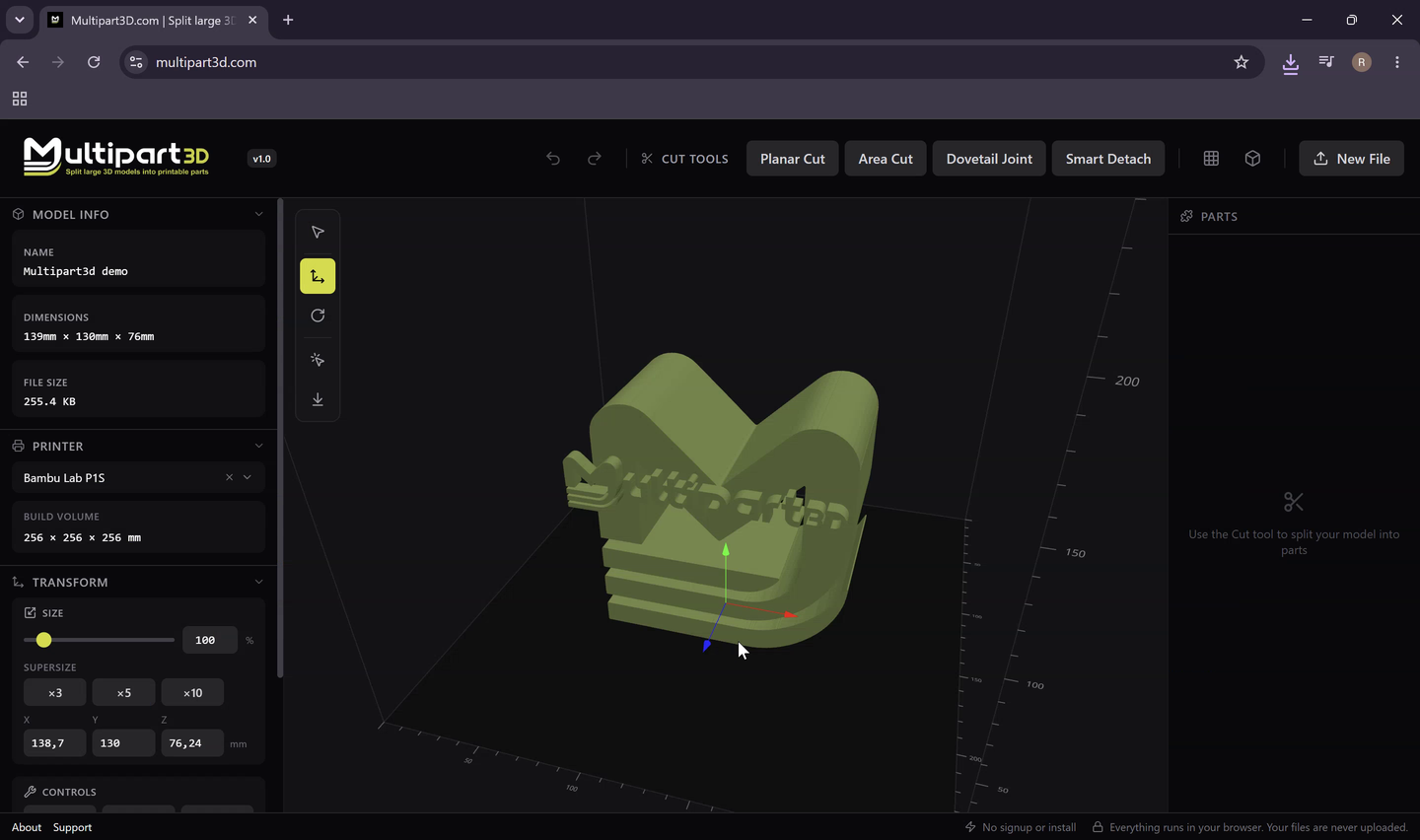
Multipart3d.com is a free browser app. You drop an STL or a painted 3MF, cut it, optionally place connectors, and export parts for your slicer. There is no account. The file is not uploaded. Processing stays in the tab. That is the product, not a privacy toggle buried in settings. See how privacy is built.
It is not a slicer, not CAD, and not a generic viewer. The job is turning a model into parts that are easier to print, align, and assemble. Version 1.2 is still early. The cuts people reach for most are already there.
The cuts
Planar cut is the classic split: a flat plane through the mesh, both sides capped, a predictable glue face. Use it when the seam can be flat and you already know where it should hide (a belt line, a collar, the brim of a helmet).
Area cut is the same plane with a mask. Only geometry inside a rectangle or circle on the plane is cut. That is how you open a hatch without bisecting the whole prop. No other tool in this roundup has a bounded window that behaves like this as a first-class tool.
Dovetail cut puts interlocking teeth in the seam. The parts slide together and resist shear better than two sanded flats. Tooth size is yours to match printer tolerance. Leave clearance or the teeth weld shut in PLA.
Smart detach is the one that matches how makers talk. Click the arm, the horn, the antenna. The tool floods the feature and peels it off. You are not drawing a plane through a shoulder and hoping. If the flood spills, click a better triangle. Plan the remount before you export: pegs, sockets, or magnets.
Separate by color is beta, and we mark it that way. Load a painted 3MF from Bambu Studio, Orca Slicer, or PrusaSlicer. Click a color region. Detach it as a part. This is the anti-AMS-purge workflow done as geometry instead of hope. Tiny speckles detach worse than clean paint islands. Keep a backup of the original 3MF.
Connectors are not an afterthought
After a cut you can place connectors on the mating face. Plugs (circle, square, hex, triangle; straight prism or tapering frustum). Dowels with a separately printed pin. Snap-fits: annular barb, cantilever hook, dual cantilever, split arrowhead. Pin holes for a metal rod or a bamboo skewer. Magnet pockets with presets such as 6×3, 8×2, and 10×3 mm. FDM and resin tolerances: tight, standard, loose, or custom.
That library is why Multipart3d.com scores 5 on joinery. Auto-pegs on every grid face are useful. They are not the same as putting two magnets on a visor and a snap on a pauldron. Non-circular plugs lock rotation. Magnets make accessories removable. Print a short tolerance coupon in your usual filament before a 20-hour prop.
Honest limits
Huge triangle counts still belong to desktop RAM and a tool that writes a Workzone folder. Browser tabs have a ceiling. There is no mesh-repair suite, no AutoShell, no engraved part numbers, no OBJ import. Color-separate is beta. Mobile is a look, not a precision editor. If your night is “slice a 1:1 bust across four P1S printers and pack the boxes,” Split3r is the adult in the room.
For a helmet, a figurine, a painted armor set, a classroom with no logins, or client work that cannot be uploaded, this is the job Multipart3d.com is built to win. Free for personal and commercial use. Attribution optional.
#2 3dsplitter.com
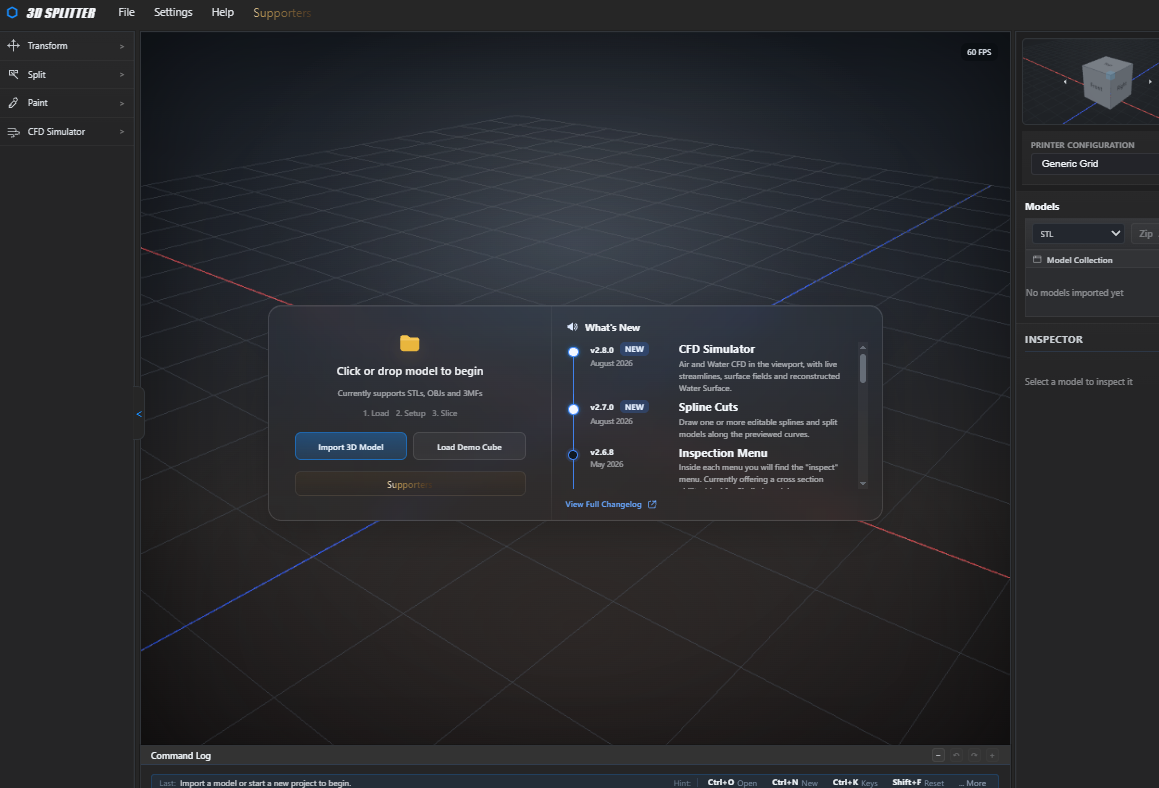
3dsplitter.com is the closest peer in this list: a free browser workspace that has been shipping features at a clip since a November 2025 v1. By early September 2026 the live UI was on v2.8, with spline cuts, pyramid cuts, puzzle cuts, sectional planes, internal and external shell, 3MF import/export, a connectors toggle, auto split, printer presets, image painting, and (this is not a joke) an air and water CFD panel.
What it does well is breadth. You can import STL, OBJ, or 3MF, move and scale, shell the mesh, drop printer presets (Ender 3, Bambu A1 / P1 / H2D, Prusa, and more), auto-split, and export STL, OBJ, or 3MF, including a zip. Puzzle and pyramid cuts give you interlocking seams without modeling teeth by hand. Sectional splitting lets you drag the width of a plane instead of only sliding it.
Where it falls over is focus. The left rail already looks like a small CAD suite. CFD in a splitter is a party trick. There is no Multipart3d.com-style magnet / snap-fit library you place pin by pin. Separate-by-color as a click-the-paint-island tool is not what we saw; 3MF colour preserve is not the same job. No login appears in the live UI. We could not confirm a privacy policy that says “never uploaded,” so the local-processing row is a tilde, not a check.
Use this if you want a free browser lab with auto-split, shell, and exotic cut shapes, and you like a dense UI. Skip this if you want a quiet, assembly-first workflow with magnets and smart detach, or you need a documented no-upload guarantee.
#3 Split3r
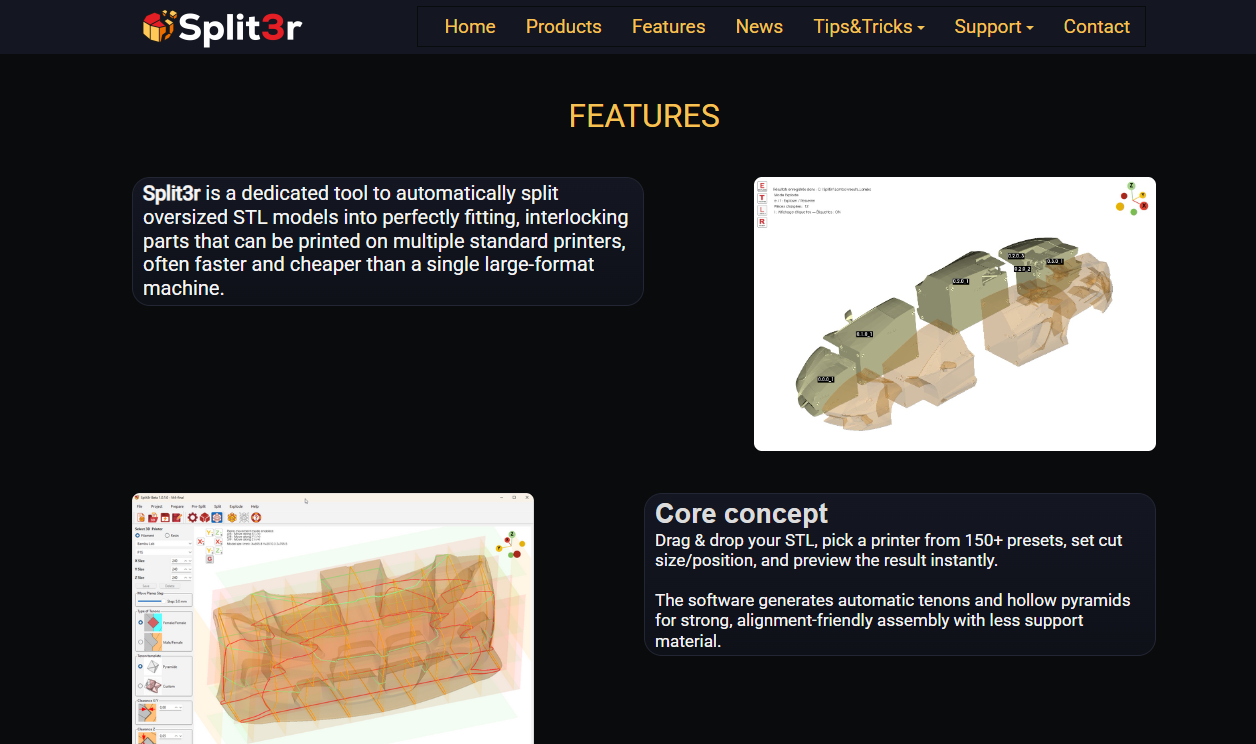
Split3r is Qualup SAS’s desktop splitter, sold as a lifetime license: Basic €60 excl. VAT, Full (Basic + add-on) €95. It is the Luban-shaped answer at a lower price than Luban’s old lifetime number. The workflow is Prepare, Pre-Split, Split, Explode. You import STL or OBJ (colored 3MF from Bambu Studio and PrusaSlicer is documented in the 1.5 getting-started guide), repair, scale, optionally AutoShell, set printer limits, place planes, generate tenons, engrave part numbers, then inspect an explode view and export for the farm.
This is the tool that takes a 250 MB mesh seriously. Multi-threaded split, 158-plus printer presets, mortise/tenon types (round, rectangular, dovetail) with templates and tolerances, a Workzone of versioned files, assembly images in one click, a to-check folder for crumbs. Version 1.5 can keep color on 3MF fragments and tint cutting faces so the printer does not waste a filament change on a grey joint.
Friction is the point. You install it. The shop page still says Windows 10 and 11 only, with Linux and macOS planned; the getting-started guide already documents a notarized macOS DMG and a Linux AppImage. Homepage copy says Windows plus Linux in beta. If you buy, confirm the current installer for your OS. Activation needs the internet. This is not a tab you open on a library PC.
Split3r does not try to be Multipart3d.com. You do not click an arm and peel it. You do not place a pair of magnet pockets on a visor in thirty seconds. You run a production split. That is a different product, and on that product it is the strongest in this set.
Use this if you print large, often, on more than one machine, and you will pay once for numbered parts that fit. Skip this if you wanted a free browser cut before dinner.
#4 stl-splitter.com
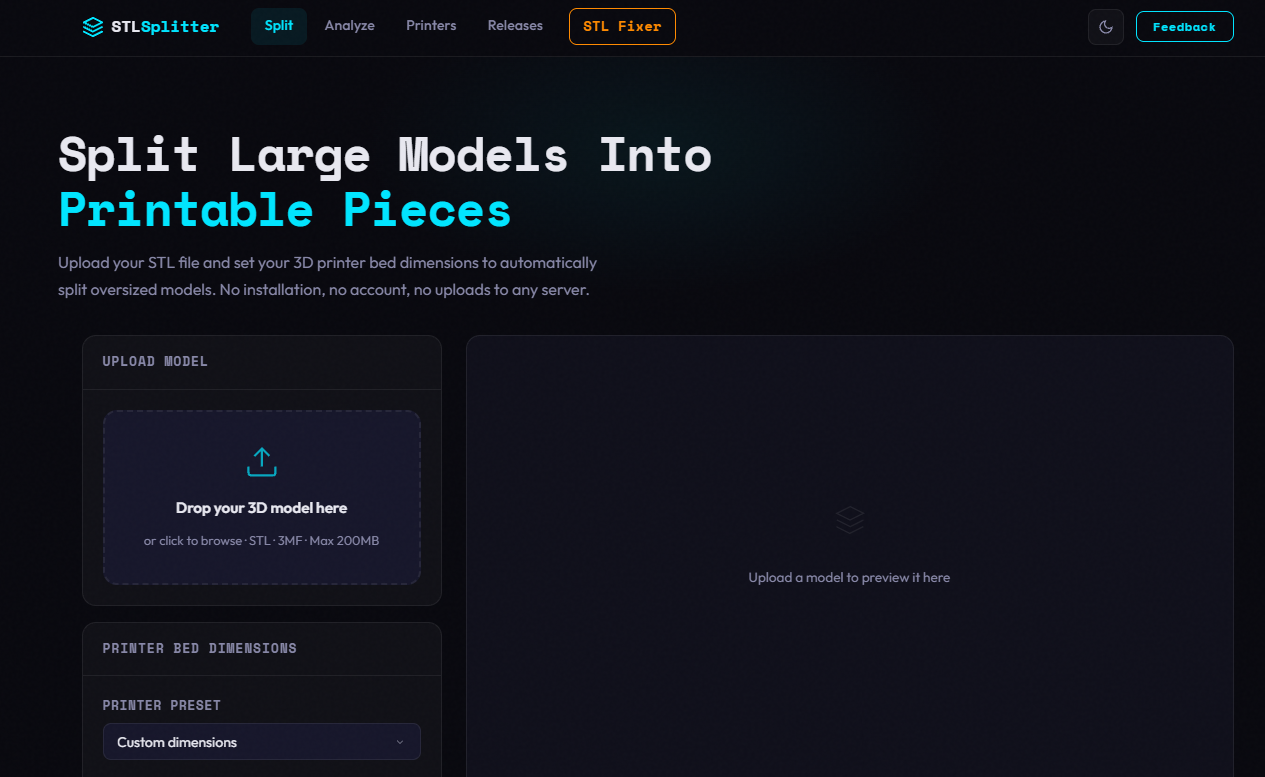
stl-splitter.com is the honest auto-chopper. Drop STL or 3MF (up to 200 MB), pick one of 60-plus printer presets or type a bed, and let it divide the model into pieces that fit. You can also add manual planes on X, Y, and Z, cut into N pieces per axis, and scale the model before the cut. Processing is local. No account.
Joints are male/female pegs, or female/female sockets you pin with your own dowel. Tilted cuts do not get joints. Small faces skip the peg and warn you. Caps are repaired when the boolean leaves a gap; complex leftovers get a warning to run slicer repair. Output is binary STL, including a zip of all pieces.
This is the right tool when the seam position barely matters: terrain tiles, a crate, a lamp that will be filled and painted anyway. It is the wrong tool when you need to hide a seam in a visor line, peel an arm, or park two 8×2 mm magnets. Cuts are axis-aligned. There is no dovetail-as-a-cut, no area window, no painted-3MF detach.
Use this if you want the fewest clicks from “too big” to “zip of STLs.” Skip this if the seam is visible or the parts have to lock in a specific way.
#5 Meshy Auto Split

Meshy is an AI 3D generator that grew a split button. The marketing splitter page invites STL, OBJ, and GLB uploads and says any uploaded model can run Auto Split. The help center and the 2026 tutorial still say the feature works on Standard, untextured (draft) models generated with Meshy 6 and 7, and that it “isn’t a general upload-any-STL splitter.” We score from the docs, not the hero.
When it works, it is a different kind of cut. The model comes apart along necks, wings, and limbs instead of a plane. Parts are capped watertight, color-coded, and laid on a plate. A slider explodes the assembly. Re-split is allowed. Optional connectors can be toggled on re-split. Export from On Plate as 3MF, STL, OBJ, or GLB. A full preview is about 40 seconds. You cannot tell it “cut at the belt” yet; language control is listed as in development. Textured models are not supported.
Cost and privacy are the other half. You need an account. Each split or re-split is 10 credits. The free plan is 100 credits a month under CC BY 4.0. Pro starts at $20 a month. Files live on AWS in the United States. That is a reasonable deal for a generated figurine. It is a bad deal for a client STL.
Use this if you generated the mesh in Meshy and want a one-click semantic split of the white draft. Skip this if you have an STL from Printables, need a chosen seam, or cannot upload the file.
Specialist: split3mf.com
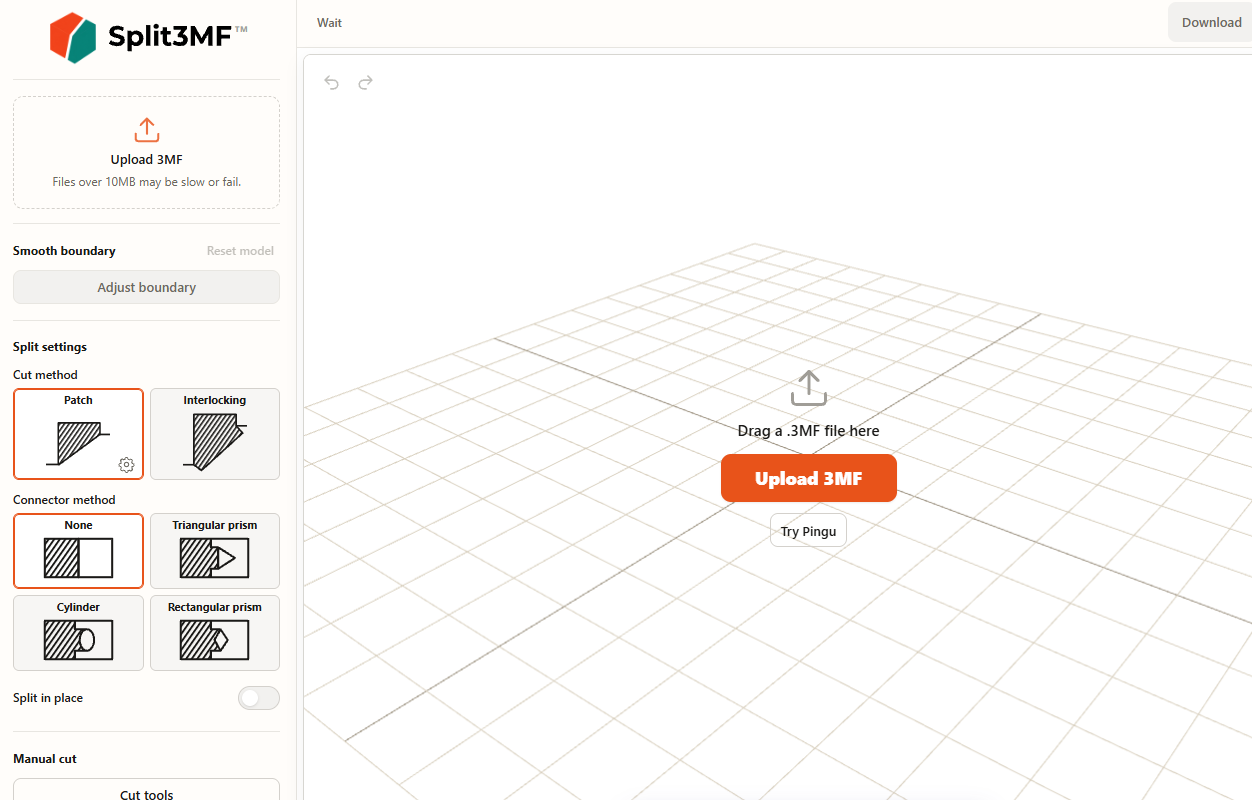
split3mf.com is not in the main chart because it is a different product. It separates one painted 3MF into color-based parts and can add simple connectors (triangular prism, cylinder, rectangular prism) or an interlocking cut. Files over 10 MB may be slow. The site is in open beta.
If your only job is “explode this Bambu paint job into filament parts,” it is a fair specialist. Multipart3d.com’s Separate by Color is the same family of problem, plus planar / area / dovetail / smart detach and a fuller connector library, on STL and 3MF. Use split3mf.com when color-split is the entire workflow. Use Multipart3d.com when color-split is one cut among several.
Use-case playbooks
1. Helmet bigger than a 256 mm bed
Open Multipart3d.com, load the STL, show the Bambu volume, place a planar or dovetail cut along a panel line, add plugs or magnets, export. Auto-grid tools will give you more pieces than you wanted, often through the faceplate. Split3r is justified if this is one of twenty helmets this month.
2. Figurine arms, fewer supports
Smart detach the arm. Print it flat. Remount with a plug or a pin hole. A bed-grid will slice the torso too. Meshy may detach limbs on a Meshy draft; it will not help a Hero Forge STL you already paid for, according to Meshy’s own tutorial.
3. Painted 3MF armor as separate parts
Export painted 3MF from Bambu, Orca, or PrusaSlicer. In Multipart3d.com, Separate by Color (beta) the armor island. split3mf.com can do this one job as its whole product. Split3r 1.5 can keep color on fragments after a volume split, which is useful and not the same as “click the red.”
4. Magnet-on accessory
Cut or detach the piece. Place magnet pockets (6×3, 8×2, 10×3 mm presets). Nobody else in the main chart ships that as a dedicated tool. Pegs are not magnets.
5. Classroom, no accounts
Multipart3d.com or stl-splitter.com. Meshy needs a login and credits. Split3r needs a license and a Windows (or beta Linux) install. 3dsplitter.com also opens without a login; the UI is a lot for a first lesson.
6. Life-size bust, overnight farm
Split3r. Repair, shell, tenons, exploded assembly images, numbered STLs. Multipart3d.com can still cut a bust by hand; it will not manage the job like a shop traveler.
Pricing and friction
| Tool | Price | Friction |
|---|---|---|
| Multipart3d.com | Free | No account. Optional tip. |
| 3dsplitter.com | Free | No login in the live UI. Supporters link for tips. |
| Split3r | €60 Basic / €95 Full (excl. VAT), lifetime | Paid license, internet activation. Windows is the production build; Linux is beta. |
| stl-splitter.com | Free | No account, no paid tier advertised. |
| Meshy Auto Split | 10 credits per split or re-split | Account required. Free plan is 100 credits/month (CC BY 4.0). Pro from $20/mo. |
Free is not the same as free-with-an-asterisk. Credits, licenses, and uploads all count. Multipart3d.com is free, including commercial work. Tips are optional.
Also-rans, briefly
Slicer cut tools (Prusa, Orca, Bambu) remain the right “one plane, then slice” path. Meshmixer still plane-cuts and is no longer maintained. Luban is the expensive desktop cousin Split3r is priced against. PrintSplit and splicestl are other browser choppers with pins or joinery. GrandpaCAD splits along an axis in the browser. None of them replace a connector library plus painted 3MF plus no upload.
Final verdict
Multipart3d.com is the tool we built for a print-and-assemble split: choose the seam, detach a feature, keep paint as parts, and put joints on the face, all in the browser, without an account. That is the typical maker job. It is also why this page exists.
Use stl-splitter.com when you truly want a bed grid. Use 3dsplitter.com when you want a free browser lab with unusual cut shapes and shell. Use Split3r when the model is a production job. Use Meshy when the model is a Meshy draft. Use split3mf.com when color-split is the entire job.
Auto-partition for Multipart3d.com is still ahead of us. Until it ships, that one row belongs to the auto-choppers. The rest of the chart is where Multipart3d.com is built to excel.
FAQ
What is the best free STL splitter in 2026?
For most hobby and client work, Multipart3d.com. It is free, needs no account, keeps the file on your device, and covers planar, area, dovetail, smart-detach, and painted-3MF color splits plus a connector library. If you only need an automatic grid that fits a bed, stl-splitter.com is faster for that one job.
Do I need an account to split an STL online?
No. Multipart3d.com, stl-splitter.com, and 3dsplitter.com all open in the browser without a login. Meshy Auto Split requires an account and spends credits. Split3r is a paid desktop license with online activation, not a web login.
Is it safe to upload STL files to a splitter?
You should not upload a paid, unreleased, or client model if you can avoid it. Multipart3d.com and stl-splitter.com process locally in the browser. Meshy stores data on AWS in the United States. Split3r runs on your PC but needs the internet for license activation. We could not independently packet-trace 3dsplitter.com; the app itself loads without an account.
What is the difference between an STL splitter and a slicer cut tool?
A splitter edits the mesh and exports new files. A slicer cut is a one-shot plane on the way to G-code. Slicer cuts are fine for a single flat seam. They do not give you area windows, feature detach, painted-3MF color parts, or a connector library aimed at assembly.
Can I split a 3MF and keep colors?
Multipart3d.com imports painted 3MF from Bambu Studio, Orca Slicer, and PrusaSlicer, and Separate by Color (beta) can detach a painted region as its own part. Split3r 1.5 can import colored 3MF and keep color on fragments. 3dsplitter.com lists 3MF split with colour preserved. stl-splitter.com reads 3MF but exports binary STL. Meshy Auto Split does not yet split textured models. split3mf.com is a specialist for exploding a painted 3MF into color parts; it is not a general oversized-STL splitter.
How do I make split parts fit back together?
Do not rely on two flat faces and hope. Use interlocking geometry: dovetail teeth, pegs and sockets, dowels, snap-fits, pin holes, or magnet pockets. Multipart3d.com lets you place those by hand with FDM and resin tolerances. Several auto-splitters sprinkle pegs on every cut face, which is handy on a grid and clumsy when you only needed two magnets on a visor.
Multipart3d.com vs Meshy: which should I use?
Use Meshy if you generated the model in Meshy and want a one-click semantic split of an untextured draft. Use Multipart3d.com if you already have an STL or painted 3MF from Printables, MakerWorld, or a client, and you need to choose the seam yourself. Meshy is not a general-purpose “upload any STL” splitter according to its own tutorial.
Multipart3d.com vs Split3r: which should I use?
Split3r is the desktop print-farm tool: numbered parts, tenons, explode view, AutoShell, 150-plus printer profiles, paid license. Multipart3d.com is the browser tool for interactive cuts and connectors on a model you still want to steer. If you are chopping a 1:1 statue across four printers overnight, look at Split3r. If you are splitting a helmet so the visor prints separately with magnets, open Multipart3d.com.
Does Multipart3d.com auto-split to my printer bed?
Not yet. Multipart3d.com shows a build-volume overlay so you can judge fit before you cut. Automatic partition into bed-sized chunks is on the public roadmap. Today, stl-splitter.com, 3dsplitter.com, and Split3r are stronger at that specific auto-chop.
Can I use Multipart3d.com commercially?
Yes. Personal and client work are allowed. Attribution is appreciated and not required.
Sources
- multipart3d.com and feature pages, including planar, area, dovetail, smart detach, color-separate, connectors, privacy, FAQ (retrieved 3 Sep 2026).
- stl-splitter.com live tool and FAQ.
- split3r.com, getting started, Basic shop, Full shop, Split3r 1.5.0 notes on 3D Printing Journal.
- Meshy splitter page, Auto Split help, 2026 tutorial, pricing.
- 3dsplitter.com live UI (v2.8 changelog visible 3 Sep 2026): split, connectors, auto split, shell, spline/pyramid/puzzle cuts, STL/OBJ/3MF export, printer presets, no login.
- split3mf.com live UI (open beta, painted 3MF color split, retrieved 3 Sep 2026).
Last researched 3 September 2026. Product UIs move. Recheck pricing and OS support before you buy Split3r or spend Meshy credits.